


EngLearn Speak: AI Tutor
0.00.00 Reviews
App Specs
- Version
- 1.6.0
- Updated On
- License
- Free
- Downloads
- 100,000+
- Developer
- DQL TechLab
- Categories
- Education
- Platform
- Android
Screenshots
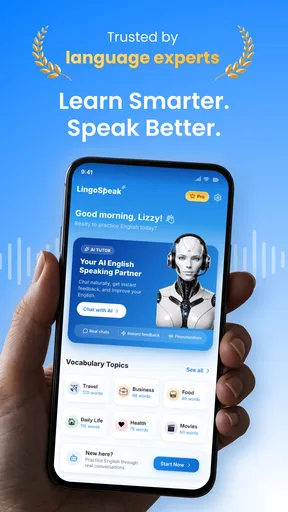
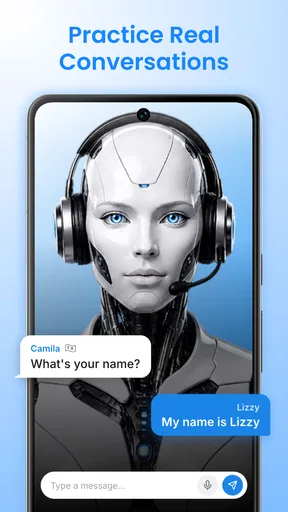
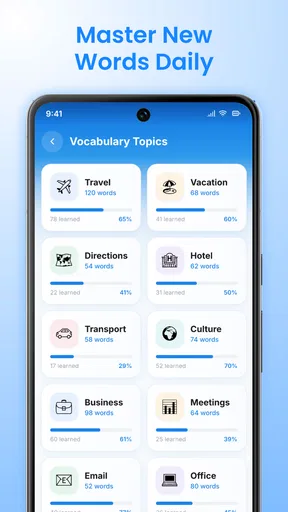
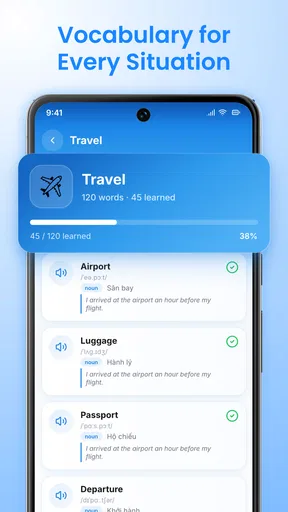
 Analysis by AppCompare
I see EngLearn Speak: AI Tutor as a practical choice for learners who need a low-pressure way to use English, not just study it. Its appeal is the chance to combine spoken practice, chat and vocabulary work in one education app. That can make it easier to turn a spare moment into active practice—but an AI tutor is not a complete substitute for a teacher, a conversation partner or a carefully structured course.
A useful role between lessons
The most convincing case for an AI practice app is not that it replaces a lesson; it is that it can help fill the quiet gaps between lessons. A class may introduce useful language, but learners still need occasions to retrieve it and form their own sentences. I would use this app for that in-between work: rehearsing a thought, testing whether I can explain it without translating every word, and identifying what I want to review next.
That role also makes expectations easier to set. If I need a complete learning plan, a teacher or structured course should lead. If I already have material to work with and need more active attempts at using English, an AI conversation can be a convenient supplement. The value is in making practice easier to start, not in promising that every exchange will correct every weakness.
Practice that fits around real life
The challenge with learning English is often not finding another explanation of grammar; it is getting enough chances to put familiar words into a sentence. I like the idea behind this app because it puts practice at the center. Instead of treating speaking, messaging and vocabulary as separate goals, it gives learners a place to work on all three without arranging a lesson with another person.
That makes EngLearn Speak most interesting as a habit-building tool. A learner who already understands basic English but hesitates when speaking may find it useful to rehearse ideas in a less exposed setting. You can try expressing a thought, notice where you get stuck, and then make another attempt. For many people, that first private rehearsal is easier than joining a live conversation where they worry about slowing someone down.
DQL TechLab develops the app, which is free to download and has passed over 100,000 installs. It is rated for Everyone, so it is aimed at a broad audience rather than a narrowly defined age group. The current version is 1.6.0, and the minimum operating-system requirement is Android 8.0. Those details make it straightforward to judge whether it fits an Android device, though the most important question is whether this style of practice matches your learning needs.
Where speaking practice can help most
Speaking is a skill that can feel awkward to practise alone, even when a learner knows what they want to say. An AI-based setting can lower that social pressure. I would use it to warm up before a meeting, rehearse a short introduction, or try to explain an everyday problem in English before having to do so with a person. The value is not that rehearsal guarantees fluency; it is that it gives you a chance to notice gaps before they matter.
Worth Reading Before You Choose

EA SPORTS FC Mobile 26 Is a Bigger Football Game, but It Takes Time

Flipboard Shows What News Apps Must Do Beyond the Feed

Switching to Android Auto Means Rethinking Your Driving Routine

Google Calendar Makes a Crowded Week Easier to Manage

Ludo King Makes the Most of the Minutes Between Plans

Baby Panda World Brings Quick Play to Modern Phones, but Its Game Library Feels Busy
A useful routine is to start with a specific situation rather than an open-ended goal like “get better at English.” For instance, practise describing your workday, asking for help, or making a simple plan. When you run out of words, note the missing expression and return to it later. This turns a chat into a small study session instead of a stream of messages that feels engaging but leaves little to remember.
Voice practice is also more useful when learners repeat a thought in their own words. If you simply aim to produce one acceptable response, you may get through the exchange without building confidence. I would treat a conversation as a prompt to try a second version: shorter, clearer or more natural. That kind of deliberate repetition is a practical way to get more from an AI tutor than from passive reading.
Make a short session do more work
A realistic weekday use might be a few minutes before an English-language call: choose one likely topic, explain your view aloud, and then try again with a clearer opening. Rather than treating the exchange as a test, I would use it to spot the point where I hesitate. Is the issue a missing word, an unclear sentence, or simply needing a moment to organize the idea? Naming the obstacle gives the next practice session a purpose.
There is a useful trade-off here. Short practice is easier to fit into a busy day, but it can be too brief to show whether a phrase has really stuck. I would occasionally return to an earlier topic instead of always choosing something new. Reusing the same idea after a gap is a practical check on recall, and it helps prevent the comfortable feeling of a fresh conversation from being mistaken for lasting progress.
Vocabulary works best when it stays attached to a situation
Vocabulary practice can become a collection of isolated words that are easy to recognize and hard to use. The strongest way to combine vocabulary with chat is to capture a word or phrase you actually needed, then make a sentence of your own with it. If you were trying to explain a delayed delivery, for example, keep the useful phrase alongside that situation rather than memorizing it without context.
I would also avoid trying to collect too many new expressions in one sitting. A small set that you can bring back into a later conversation is more useful than a long list you never revisit. The app’s combination of chat and vocabulary makes this kind of workflow a natural fit, even for learners who prefer short sessions. It is a personal study strategy, not a promise that the app automatically organizes every learner’s revision in a particular way.
For a busy learner, that distinction matters. You do not need a long uninterrupted block to practise one real-life exchange, but you do need to pay attention to what you learned. A few focused minutes between errands can help if you leave with one phrase to reuse. If you only tap through a conversation while distracted, the session may feel productive without improving what you can recall later.
The trade-off: convenient practice is not the same as a full course
The app’s format is a strength for flexible practice, but it also sets a limit. Learners who need a carefully sequenced curriculum, detailed grammar instruction or a human teacher’s judgement may find that AI conversation alone does not give them enough structure. It can help you practise producing English, but a tutor-led class or a course with a clear progression is a better fit when you need someone to diagnose persistent errors and plan what to study next.
There is another trade-off in practising with an AI rather than a person. A private, repeatable exchange can help reduce hesitation, but it does not reproduce every pressure of real conversation: accents, interruptions, misunderstandings and the need to respond naturally to another person’s reactions. I would use the app as preparation, then look for chances to speak with people when the goal is real-world interaction.
It is also worth keeping expectations measured. AI practice can feel conversational, but learners should still check important language in a trusted learning resource or with a qualified teacher, especially when accuracy matters for work or study. The app can be part of a learning routine without being the only source of guidance. That is a sensible boundary for any AI language tool, not a reason to dismiss this one.
How it compares with other ways to learn
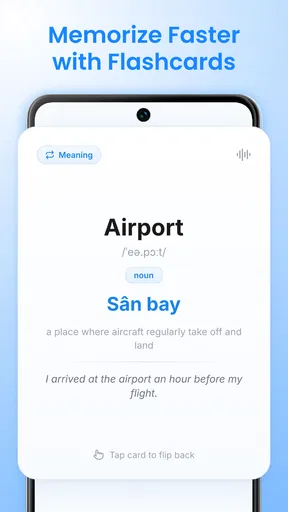
Compared with a conventional vocabulary app, the appeal here is the opportunity to move beyond recognition and try to produce a thought. Flashcards can be excellent for quick recall and systematic review, but they do not by themselves recreate the act of explaining an idea. Conversely, a textbook or a well-sequenced course is usually better at laying out grammar and progression. I would not expect one format to do every job equally well.
A human conversation exchange offers something an AI cannot fully imitate: another person’s perspective, spontaneous reactions and the give-and-take of a real social exchange. It may also require coordination and can feel intimidating when a learner is just starting to speak. This app’s likely advantage is convenience and privacy; its limitation is that low-pressure practice should eventually lead toward real interaction, not become a permanent replacement for it.
Who should try it—and who may prefer something else
I would recommend giving it a try if you are learning English and want more chances to speak or chat without scheduling another person. It seems particularly suited to learners who already have some basic vocabulary, understand simple sentences and want to become less hesitant. It may also suit someone who has a few minutes at a time and is more likely to practise when the activity feels conversational rather than like another textbook exercise.
It is less likely to be the right main resource for a complete beginner who needs explanations from the ground up, or for a student preparing for a formal exam who needs targeted practice and reliable feedback against a specific syllabus. In those situations, a structured course or a teacher can provide a clearer route. Likewise, if your main goal is pronunciation coaching with detailed human feedback, practising with an actual instructor or speaking partner may be a better investment of your time.
One realistic way to use it is to practise before a weekly English-language call. Pick a topic you expect to discuss, try explaining your point in a chat, and make a note of the words you lacked. Then use the next conversation to see whether those expressions come more easily. This gives the app a clear job: prepare and reinforce, rather than stand in for every other part of learning.
It is also worth asking what kind of feedback you personally need. If you mainly want a safe prompt to get words flowing, AI-led practice may be enough to make starting easier. If you want a specialist to explain why a sentence is wrong, distinguish between subtle shades of meaning, or assess your performance against a defined target, I would pair the app with a teacher or a more structured resource. The right choice depends less on how engaging a session feels and more on whether it addresses the obstacle you actually have.
Free to start, with paid extras to weigh
The app is free, which makes it easier to test whether AI-led practice suits you before committing money. It also offers in-app purchases ranging from $6.99 to $89.99 per item. That is a wide spread, so I would check what an individual purchase includes and whether it supports a routine you will genuinely use before paying. A free starting point is helpful, but it does not mean every useful option is necessarily free.
For a fair trial, focus on the learning experience rather than the novelty of chatting with AI. After several sessions, ask yourself whether you are speaking more readily, remembering phrases from earlier practice, or finding it easier to express a complete thought. If you are not getting a concrete benefit, adding a paid purchase is unlikely to solve the underlying mismatch. If you are using the app consistently and know which part helps, then you can make a more informed decision about whether an extra is worthwhile.
A sensible companion for building confidence
My overall view is that EngLearn Speak: AI Tutor is best approached as a convenient practice companion, not an all-in-one English school. Its mix of speaking, chat and vocabulary gives learners a useful way to make practice more active, especially when embarrassment or a crowded schedule gets in the way. The key is to enter with a purpose, save what you genuinely need, and bring those words back into later conversations.
I would suggest it to someone who wants a private place to rehearse and is willing to build a simple routine around it. I would not choose it as my sole resource for structured instruction, exam preparation or nuanced feedback. Used alongside a course, teacher or real conversation partner, it can fill a practical gap: more chances to try, stumble and try again. That is a modest promise, but for a learner who needs exactly that, it is a worthwhile one.
Pros
- AI tutor offers flexible speaking practice whenever you have time.
- Conversation-based lessons can help build confidence speaking English.
- Personalized feedback may help highlight areas to improve.
- A mobile format makes it easy to practice in short sessions.
- Useful for learners who want extra practice beyond classroom lessons.
Cons
- AI feedback may not always catch context or pronunciation nuances.
- Speaking practice requires a quiet place and a working microphone.
- The app may be less effective for learners seeking live conversation.
- Some features or lessons may require a paid subscription.
- Internet access may be needed for AI-powered practice.
FAQs for EngLearn Speak: AI Tutor
What is EngLearn Speak: AI Tutor?
EngLearn Speak: AI Tutor is an English-learning app centered on speaking practice with AI assistance. It is designed to let learners work on spoken English through interactive exercises and receive guidance while they practise. The exact lessons, tools and available topics can vary by app version, so check the current store listing to see which features are included before downloading.
Is EngLearn Speak: AI Tutor suitable for beginners?
The app may be useful for learners at different stages, but the experience depends on the level options and lesson content available in your version. Beginners should look for introductory lessons, clear instructions and opportunities to practise basic phrases before starting. If the app does not let you choose a level, try a short session first to judge whether its speaking activities match your current ability.
Does EngLearn Speak: AI Tutor require a subscription or include in-app purchases?
Pricing and access can change, and some learning apps offer a free download while reserving selected lessons or features for a paid plan. Before installing EngLearn Speak: AI Tutor, review its Google Play or App Store listing for subscription terms, trial details and in-app purchases. If you start a trial, check its renewal date and cancellation instructions so you understand when charges may begin.
Do I need an internet connection to use EngLearn Speak: AI Tutor?
AI-powered speaking practice generally needs an internet connection because audio or text may be processed online. Some apps also require connectivity to sign in, load lessons or save progress, while offline access—if offered—may be limited to downloaded material. Check the app’s store information and test its behavior before relying on it for travel or study in places without reliable internet.
What should I know about privacy before using EngLearn Speak: AI Tutor?
Speaking practice can involve microphone access and may send voice recordings or transcripts to online services for feedback. Before using the app, review its privacy policy and the data-safety or privacy details in your app store, including how audio is handled, whether information is shared, and how to delete an account or data. Grant microphone permission only when you are ready to practise.


